Giving My Hermes Agents a Machine of Their Own
Overview
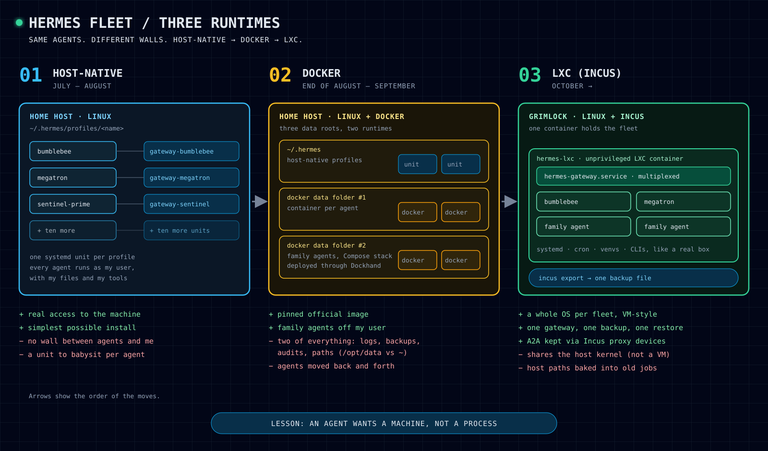
In Part 1 I mentioned, almost in passing, that my very first Hermes agent was a plain localhost install and that I intentionally did not use Docker. I wanted the agent to have real access to the machine — after all, its job was to be my sysadmin.
That decision did not survive contact with a growing fleet. In the last three months my agents moved home twice: from host-native profiles, into Docker, and then into what I now think is the right answer for me — a VM-style system container with Incus and LXC. This post is the story of that pivot, including the parts where I went back and forth.
Act 1 — everything on the host
The host-native setup is the one you get from the install script. Everything lives under ~/.hermes, every profile gets its own folder under ~/.hermes/profiles/<name>, and each profile's gateway (the process that talks to Telegram, runs the cron jobs and so on) ran as its own systemd unit: hermes-gateway-bumblebee.service, hermes-gateway-megatron.service, and so on.
It is simple and it works. The agent can use every tool on the machine, its Python scripts use the same paths I use, and debugging is just journalctl and a shell.
The problem only becomes visible as the fleet grows. By the end of the summer I had more than a dozen profiles, and all of them ran as me. Same user, same home folder, same files. Some of these agents were not even mine — I had set up assistants for my family and for friends, and having them run as my own Linux user with access to my home folder started to feel wrong. There was no wall between the agents and me, or between the agents themselves.
Act 2 — let's put them in Docker
So at the end of August I did what every developer does when they hear the word isolation: I reached for Docker.
Hermes publishes an official image, so I pinned it and started moving gateways into containers, each one with its own profile data mounted from a folder on the host and attached to an isolated Docker network. My own agents got one data folder, the family and friends' agents another. A few weeks later the family containers became a proper Compose stack in Dockhand, backed by Git. At the peak, 10 of my 14 gateways were running in Docker.
And for a few days it felt great. Then the friction started.
Everything existed twice. I now had three data roots (the default ~/.hermes plus the two Docker folders) and two kinds of runtime. Every tool around the fleet needed two code paths:
- The backup script had to create in-container archives for the Docker profiles and normal ones for the rest.
- VictoriaLogs had to mount the right log folders from each place.
- My fleet-admin agent's audits needed
docker execfor half the fleet and plain commands for the other half. - New things like the Jev decision layer I only ever got working for the host-native profiles. The Docker ones were simply "out of scope".
Paths drifted. Inside the container the agent's data lives under /opt/data, on the host under my home folder. Every script, cron job and skill that mentioned a path was a small trap.
Agents moved back and forth. This is the honest part. I moved Bumblebee, my main assistant, into Docker on the 5th of September. By the 8th it was back on the host, together with two other agents. Things like a coding agent that needs my ~/dev folder, or an assistant that needs CLI tools I had installed on the host, are just awkward inside an application container. When you keep migrating the same agents in both directions, the architecture is telling you something.
Docker is built for a process, not a resident. A Hermes agent is not a stateless web service. It has cron jobs, Python virtual environments, CLIs it installs for itself, SQLite databases, a memory store, skills it writes and updates. It behaves much more like a person living on a machine than like a process serving requests. Docker can host that, but you end up fighting the model rather than using it.
Intermission — Grimlock
Around the same time Grimlock joined the homelab, and that gave me a clean slate. At the end of September I moved the family agents onto Grimlock as host-native profiles and retired the Docker setup completely. So for a short while I was back to Act 1, just on a new machine.
But the original itch was still there. I wanted the agents to have their own space — not my user, not my home folder — without going back to the two-of-everything world of Docker.
Act 3 — VM-style isolation with Incus and LXC
What I actually wanted was something that behaves like a small VM: its own operating system, its own users, its own systemd and cron, a filesystem the agents can treat as home — but cheap enough to run on a tiny ThinkCentre.
I started on my desktop. I installed Incus (the community fork of LXD), which can run both system containers (LXC) and full VMs (QEMU), and spun up a throwaway Ubuntu VM to try a clean install. It worked, with one small adventure: on that Incus version the Ubuntu cloud images went into an endless reboot loop, while the plain images booted fine.
Playing with both made the choice easy for me:
| Option | What it is | Why (not) |
|---|---|---|
| Docker | application container | great for services, awkward for a resident agent |
| Incus VM | full QEMU VM, own kernel | strongest isolation, but heavier and slower to boot |
| Incus container | LXC system container, shared kernel | a "whole machine" feel, light, snapshots and export like a VM |
An LXC system container runs a full init system, so inside it Hermes looks exactly like it does on a normal Ubuntu server — the install script, systemd units, cron, everything. But it shares the host's kernel, so it costs almost nothing compared to a VM. For my threat model — keep agents off my user and my files, and keep the fleet as one manageable unit — that is the sweet spot.
Building hermes-lxc on Grimlock
On the 9th of October I installed Incus on Grimlock and put its storage on the second disk. Then I created an unprivileged Ubuntu container called hermes-lxc. Unprivileged means root inside the container is mapped to an ordinary user on the host — another nice wall.
The first surprise had nothing to do with Hermes. The container got an IP address and DNS, but could not reach the internet. Docker, which also runs on Grimlock, manages the firewall on that host and was quietly dropping the container's outbound traffic. A couple of narrowly scoped rules, re-applied automatically whenever Docker restarts, fixed it. If you mix Docker and Incus on the same box, expect this.
Moving the agents in
Each profile moved with the same routine:
- Take a fresh, integrity-checked backup of the profile.
- Park the host gateway, so the same Telegram bot is never running twice.
- Copy the profile into the container.
- Rewrite paths (my home folder becomes the container user's home), MCP server commands, the skills folder and cron script paths.
- Validate with
hermes config checkand an SQLite integrity check, and only then publish it.
The host copies stayed parked, so rolling back would have been a matter of minutes.
One thing I really like about this setup: inside the container there is now one Hermes gateway that serves all the profiles (Hermes can multiplex profiles in a single gateway), instead of one systemd unit per agent. Each agent still has its own home, database, memory and Telegram bot.
The bugs that showed up after the move
A migration is never done when the copy finishes. The real test was the next day of cron runs.
- A2A went quiet. My agents talk to each other over A2A, and the moved agents' config still pointed at an address that belongs to the host, not the container. Instead of making the container its own node on my private network (more identities, more keys), I used Incus proxy devices, which forward the connection from the host into the container. Every peer kept the same URL and nothing else had to change.
- Host paths baked into jobs. A family calendar job looked for a Python virtual environment that only existed on the host. My main assistant's virtual environment was a copy that still linked to the host's Python. All easy to fix once found.
- The scariest one: a job that lied. A morning summary job could not find one of its CLI tools at the old path, so it ran with half its input missing and still reported
ok. Nothing crashed, nothing alerted. Since then, grep every job for the old home path is a fixed step in any move.
One container, one backup
This is where the pivot paid off the most. Backing up the fleet used to be a script with special cases for host profiles, Docker profiles and family profiles. Now the whole fleet is one thing:
- A systemd timer runs
incus exportwith zstd compression and writes a single file to my backup storage. - A few GiB, a handful of minutes, with the agents running the whole time. (The default gzip took more than three times as long. Compression, not the network, was the bottleneck.)
And because a backup you have never restored is only a hope, I tested the restore: import the file as a second container right next to the live one, start it with no network at all, and check it. That part matters. The copy has the same Telegram bot tokens as the live agents, so if it came up online, it would start fighting the real bots for their messages. With the network removed it booted, every profile was there, and all 292 SQLite databases passed their integrity check.
Not perfect, but better
To be fair to Docker and to VMs:
- An LXC container shares the host's kernel. It is not a VM, and I would not call it a hard security boundary.
- Whoever can manage Incus effectively has root on the host, so treat that access like root.
- An export contains everything the agents know, credentials included. Treat the backup file as being as sensitive as the agents themselves, and encrypt it.
For a homelab fleet of personal assistants, I can live with all of that.
Lessons learned
If you are running more than a couple of Hermes agents, this is what I would tell you:
- An agent wants a machine, not a process. Give it an environment that behaves like a real box: systemd, cron, a home folder, its own tools.
- Pick one runtime. A mixed fleet means every backup, log pipeline and audit has to handle every case. The biggest win of this move was deleting special cases.
- Test the restore with the network off, and encrypt the backup. Your agents' credentials travel with it.
- Search for your own home path. Old paths do not fail loudly; sometimes they just quietly do less.
So far the agents seem perfectly happy in their new home, and I am happy that Grimlock now runs the fleet as one box I can export, restore and reason about. Let's see how long it lasts!