From Dockhand Clicks to Git-Backed Stacks
I did not plan any of this. It happened the way most homelab things happen: I ran one container, then five, then I could not remember which host was running what. True story. Many homelabers can validate its true.
The first improvement was Dockhand on my main Docker host. One page with all the containers, logs, ports and volumes on it, instead of SSH-ing into three machines. Good, but a UI over docker run is still docker run. How those containers had been created existed only in my head and in shell history.
So the next step was Compose stacks, one directory each under a stacks folder in my home directory. Dockhand adopts those happily, and I finally had a list of stacks instead of a pile of containers. It had one problem, wearing two hats: the compose file lived on exactly one machine, and editing it in a web textarea gives you no diff, no commit message, and no way to answer "what did I change last Tuesday?". I have spent my whole professional life telling people to put things under source control, and there I was, editing YAML in a browser.
Git stacks
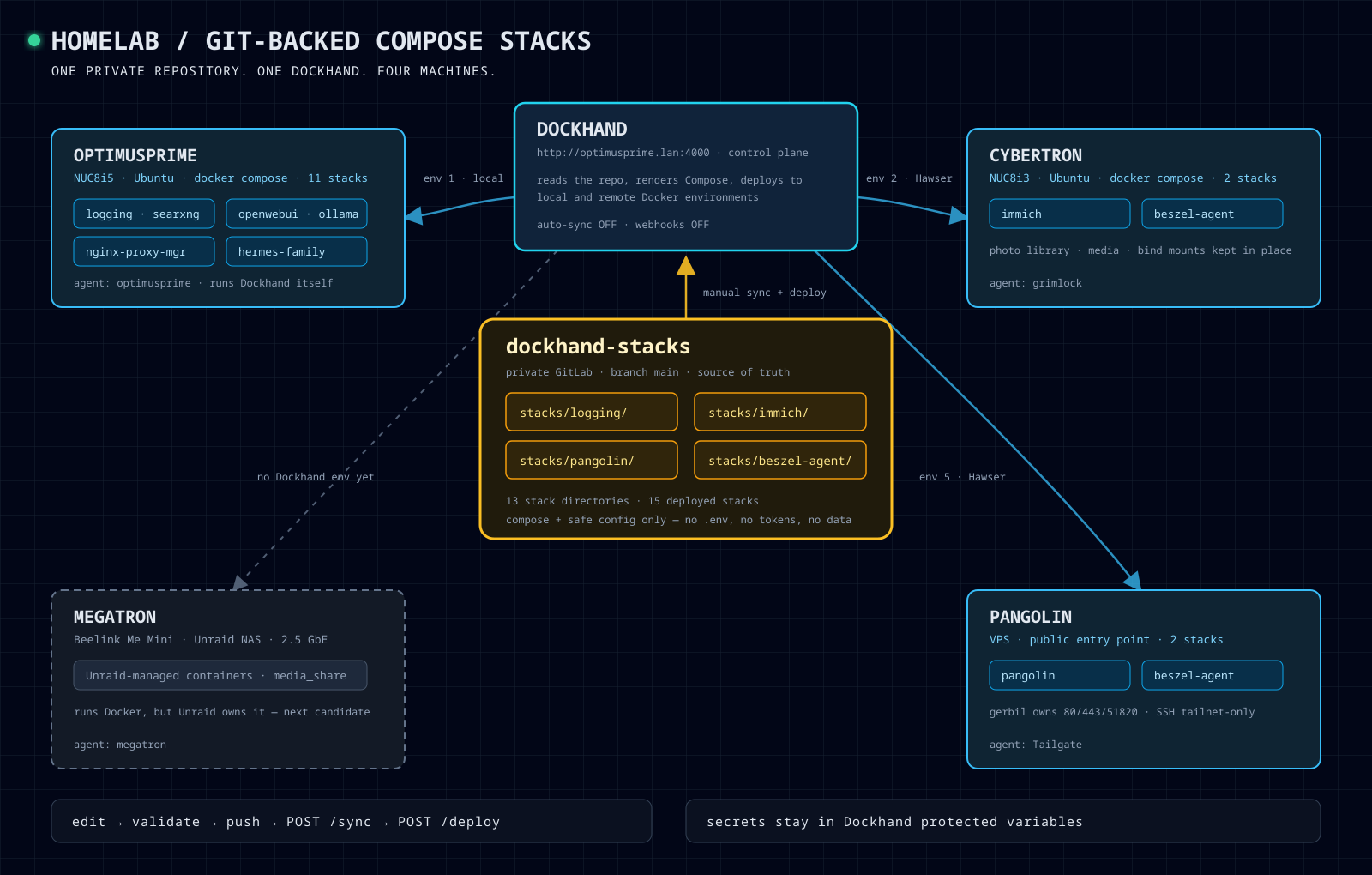
Dockhand can back a stack with a Git repository, so two days ago I did it properly. There is now a private GitLab repository, dockhand-stacks, and it is the source of truth for every Compose file in the homelab:
1dockhand-stacks/
2├── SECURITY.md
3└── stacks/
4    ├── logging/compose.yaml
5    ├── immich/compose.yaml
6    ├── pangolin/compose.yaml
7    ├── beszel-agent/compose.yaml
8    └── ...
One directory per stack, the compose file, the supporting config that is safe to version, and a small README with that stack's hazards. Thirteen directories, fifteen deployed stacks, because some definitions are reused on more than one machine.
Dockhand holds a read-only deploy credential, clones the repository and deploys to whichever environment I pick. The target host is Dockhand metadata, not a directory in the repository, so one compose file can run on several machines with per-host variables. That is how the same monitoring agent definition ends up on three hosts without three copies of it.
There is one machine still outside all of this — the NAS, where the OS owns its own containers. It annoys me slightly every time I look at the diagram.
No secrets are in the repository, only variable names. The values live in Dockhand's protected variable store, and a SECURITY.md says exactly that, mostly so that future me does not get clever at midnight.
Manual on purpose
Automatic sync is disabled. Webhooks are disabled. There is no push-to-deploy, and that is the point: a push that silently recreates the container serving my photo library, or the one owning ports 80 and 443 on a public VPS, is not a feature I want at 23:40 on a Friday.
The loop is: edit, docker compose config --quiet, read the diff, push, then POST /api/git/stacks/<id>/sync and POST /api/git/stacks/<id>/deploy, then check health, ports, mounts and that the named volume is still the same named volume. Rollback is the same loop with an older commit — and it is not down -v, which is how you turn a bad afternoon into a restore-from-backup evening.
Not everything belongs in there, either. A few services already have an owner — something deployed by its own CI pipeline, or a container whose runtime details are easier to keep on the host than to describe in a repository. Putting those under Git stacks as well would mean two systems deploying the same thing, which is worse than either one on its own. So they stayed out, on purpose.
The agents did the grind
I did not export thirteen compose files by hand. My Hermes agents did, each one on the machine it looks after. They read the live stacks through Dockhand's API, stripped the secrets, wrote the per-stack READMEs and verified every deployment afterwards. The ones touching a database took a backup and kept a rollback copy first, and the agent on the public host got a written handoff of what was now Git-owned and what it must not touch.
Their toolbox is deliberately narrow — read-only inspection plus single-container start/stop/restart, confirm=true required, and a read-back after every action. I still own the architecture, the credentials and anything destructive.
What changed is the ratio. I spent the evening making decisions, and almost none of it typing YAML into a browser and hoping. A couple of years ago this would have been a weekend. It is a very good time to be a homelabber.
- Dockhand
- VictoriaLogs for my homelab — where the logs from all these containers end up
- Hermes Agent