Geeking out with Hermes Agent - the journey so far - Part 1
Overview
How it started
Like many people out there, I do have a thing for chatbots and assistants. I cannot remember how my professional and digital life was prior to Slack and things. Before bots, I was (and still am) really into chat applications: Yahoo Messenger, ICQ, MSN — all the usual suspects. So it kind of makes sense that in the era of LLMs, where chatbots are now super-powered, I am incredibly excited about the possibilities of the overall ecosystem.
Things got serious two years ago when, as a side project, I started coding a Slack bot. I named him pukie and he lives inside a long-running Slack workspace that I maintain to chat with friends and colleagues. As I said, I am really into chat applications and it is my way to keep a daily connection with people that I cannot actually meet in person anymore — most of them are back in Greece.
I do love Slack, so it made sense. I started the project, like many people, at night during free time. It was a good opportunity to dive into the Slack SDKs and build something that could actually be useful for me and my friends. The thing is, the bot initially did not do much other than replying or trolling my friends with auto-replies that I was trying to make look smart, and adding emojis. The more I got comfortable with the Slack SDK, the more my bot started to become a thing.

The era of LLMs
As LLMs came into our lives, I started utilising things like Claude Code or Codex to add more features to my beloved bot. That was really the first step to actually realise that my capacity to add features in my free time had exploded! From its inception, my bot was leveraging things like random answers. Then I started using things like Trie-based matching that would parse the public chats and add some predefined answers based on the context — it would just hijack a conversation with something insulting or funny.
It was really funny and I was pretty excited. Then, like many other people, I started wondering: what if my bot, instead of being coded (with assisted coding) by Claude or OpenAI, became fully interactive? Why don't I attach it to an LLM and give it "life", kind of? Obviously I was not the only one with this idea. So many months ago, I integrated Google Gemini (through their Java SDK) and pivoted my bot from the era of pseudo-random replies and Trie-based matching to actually LLM-powered responses.
Even at that point, when my bot was still super simple and before I deep-dived into what is now known as agents and harnesses, in my own very simplistic way I was trying to invent things that I now see are kind of established across many of these agentic codebases. Things like SOUL.md, Memories.md, and that "self-improving" loop that all the modern agentic harnesses now feature — I was trying to invent them not because I was some kind of expert, but because I was driven by common sense. The pivot from random predefined answers to an LLM replying interactively and kicking off conversations changed everything for me. This lasted for months and I still code and add features to my Slack bot, but the emergence of things like OpenClaw and the desktop-based harnesses like Claude Code led me to Hermes.
From OpenClaw to Hermes
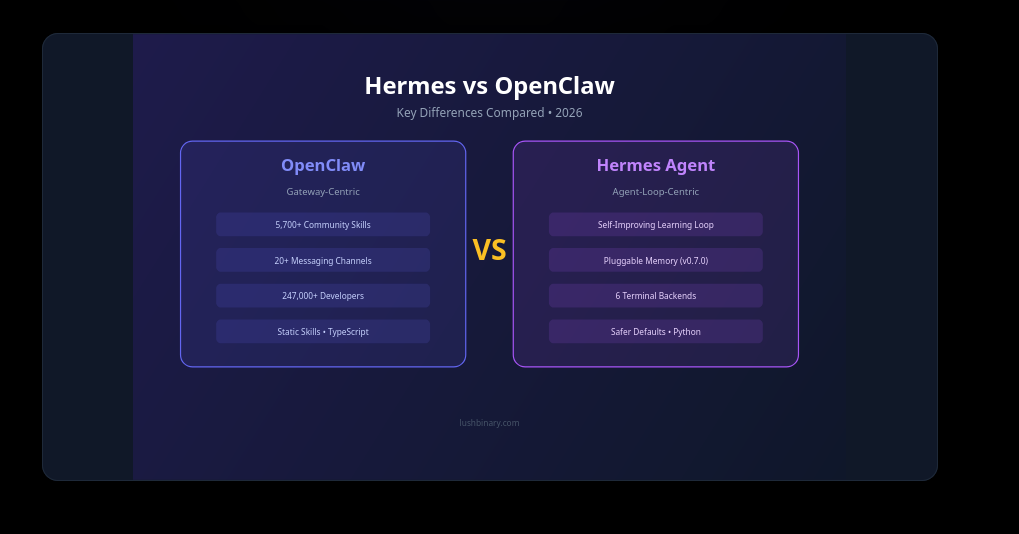
I did install OpenClaw, going with the flow and the frenzy about it. It felt a bit weird — like many other people, I got spooked a bit by the idea and the capabilities. I spent some time reading the code as well and I was not super impressed (don't get me wrong, it was a bit more cowboy than I was ready for, but I don't want to be dismissive — I just did not feel it was the right fit). For a while I abandoned the idea of using any harness, until I read about Hermes and started going through their code and documentation. I really liked their docs, and despite the fact that Python is not my main programming language, I spent some time reading the codebase and really enjoyed the structure of it.
The first two things that drew me towards Hermes were the implementations around SOUL.md and Memories.md, which reminded me of my initial attempts to do something similar with my own bot — but Hermes was better thought out and more mature in terms of architecture and design. See here and here for details. The other thing that got me intrigued was how Hermes implements what I like to call the never-ending, ever-improving loop. The agent is practically a loop that continuously improves its performance by learning from its own experiences and feedback, and it does that by writing and reading code. I am oversimplifying a bit, but in a way most of these agents or harnesses are literally loops that keep notes, use skills (instructions), review their instructions, and add more context over time. I was hooked!
My first Hermes-powered sysadmin
Up until now, I have gone through several iterations on my adoption of Hermes and how I deploy and utilise the agent. My intention with this blog post is to go step by step and document my experiences around deploying and learning how to use it. This process has consumed quite a few of my late-night coding sessions, but has also made me super excited. Fair enough — you can call it geeking out, but I do feel that these kinds of tools (agents, harnesses) are an early stage of code automation that will mature and eventually make it into our networks, laptops, phones, etc. Some of their technical characteristics might not be the same in a year's time — how they collect memories, how their loop evolves — but the fundamentals will remain.
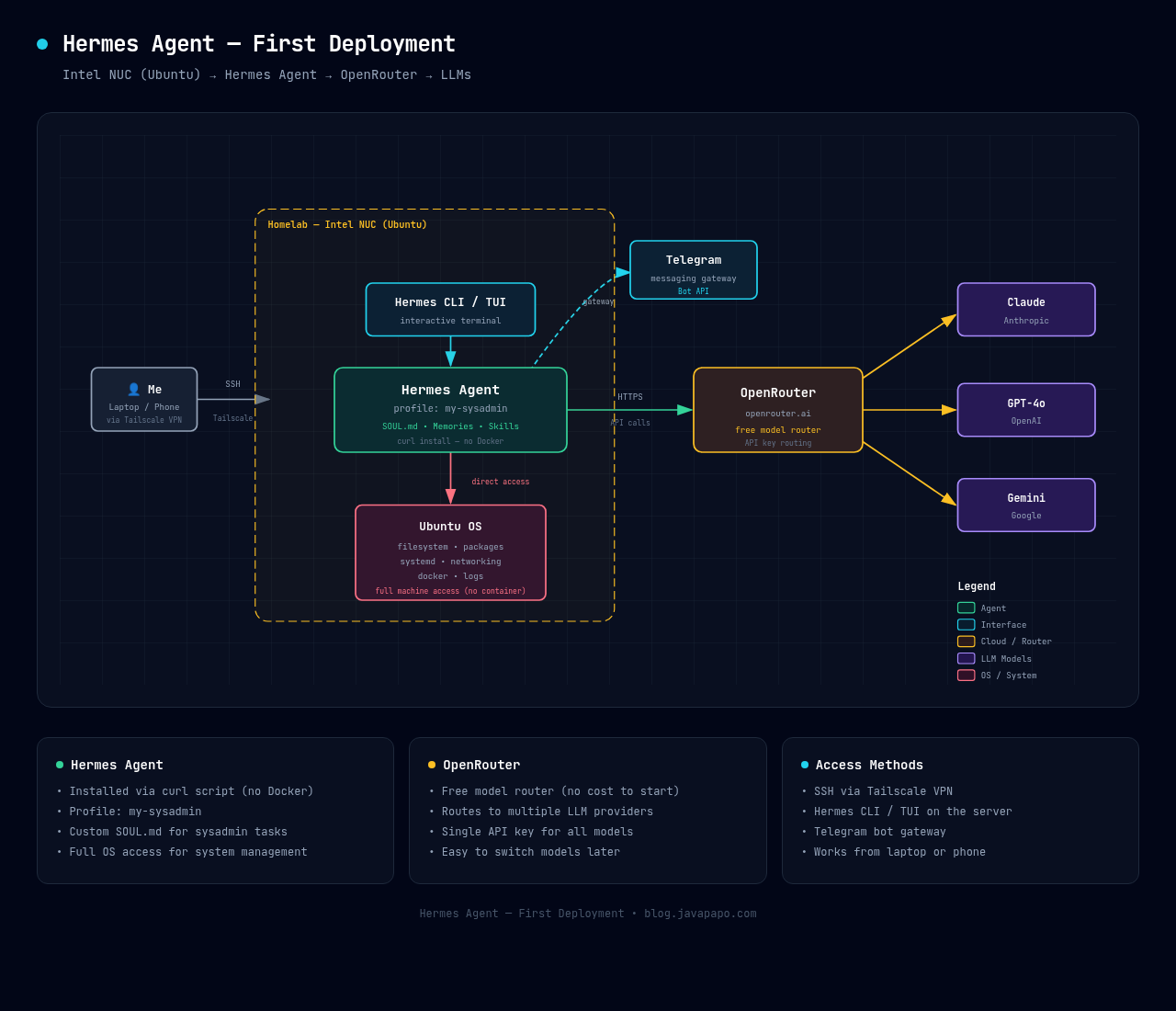
My first use case for Hermes — and actually my first installation — was not to replace my Slack bot but to add an agent that would help me act as a system administrator for my small fleet of cheap homelab servers. See here.
My very first agent was a localhost installation using the curl script called my-sysadmin. I deployed it on one of my Ubuntu servers and intentionally decided not to use Docker — I wanted the agent to have real access to the machine and the operating system, not be running in some isolated container.
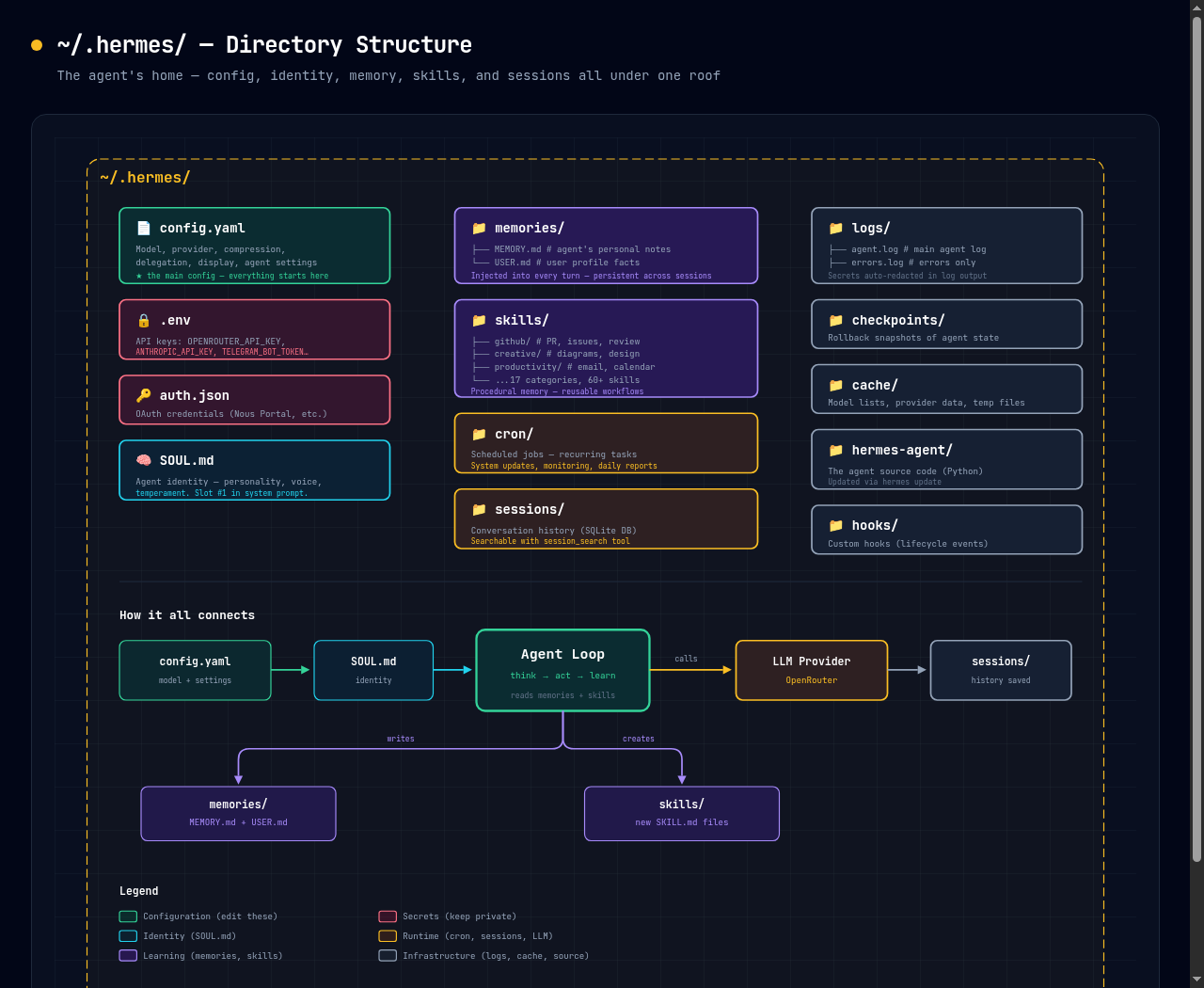
Once installed, everything lives under ~/.hermes/ — the config, the agent's identity, its memories, skills, scheduled jobs, and session history. Here is what the directory structure looks like:
Around the same time, through Hermes I decided to give Telegram a try. I am a WhatsApp and Signal user, and despite having a Telegram account I had never really used it extensively. That's how my first sysadmin-agent was born. I started using it mostly through the Hermes CLI — I would SSH into my homelab server (god bless Tailscale, by the way), fire up the hermes CLI command, and land in the Hermes TUI.
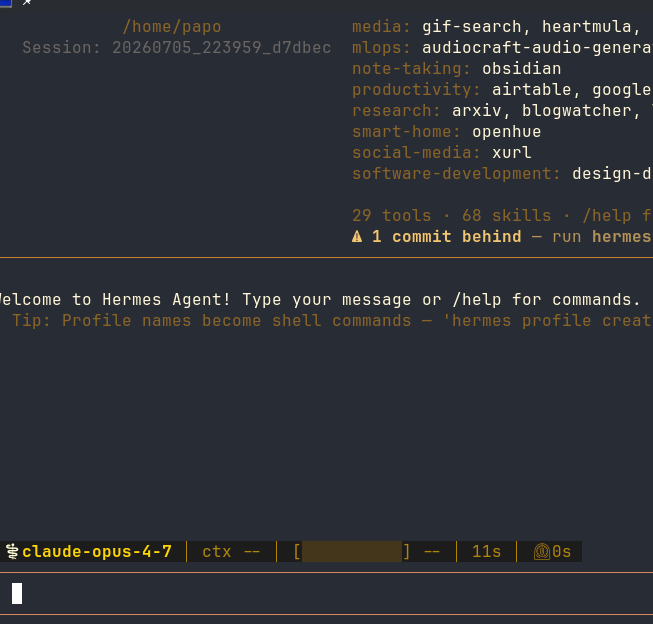
In the first few days, I was mostly interacting with the agent from the TUI, trying to mimic my usage patterns with Claude Code — after all, it is the agent I have used more than anything up until now. I had seriously spent money and time on it, so I thought Hermes could serve a similar role. I soon realised that this was not the case. Hermes as a harness is more of a generalist with a lot of diverse, built-in skills, and the main reason I had spun up that agent in the first place was to act as a system administrator for my homelab server.
Speaking of Claude Code, I actually used it in the first weeks to help me with the initial setup and configuration of the agent. I asked Claude to help me write a good SOUL.md, and I was also copying and pasting Hermes's config.yaml back and forth, asking Claude to explain — with the help of the documentation — what all the different settings did.
While I was doing all of the above, I should also mention that during my late nights with Hermes I decided to reactivate a somewhat dormant account with OpenRouter.ai. I wanted to power my agent, but in the beginning I was really cautious, so OpenRouter's free model router was my go-to setting for my initial agents. See here. You still need an account so that you can generate API keys, but you can get started with the free model router without any cost — which was really great at that point. I really like OpenRouter because, as I will expand on later, its service is super compatible with Hermes's ability to delegate and switch LLMs depending on the task. With a consolidated API key I could see how the agent was performing, which LLMs it was picking, and how much it would cost me when I eventually moved out of the free tier.
Learning my agent and expanding its capabilities
The more I worked with my agent — and started utilising Telegram — the more my ways of working changed. It was no longer the usual "let me sit at my desk and open the TUI" like I had done many times with Claude Code while coding. I started interacting with the agent when I was commuting to work, sitting in the living room, or whenever I had five minutes of free time. I also started to understand things like Memories.md and how the Skills system worked.
Obviously the main use case was to try and enhance my agent with skills and knowledge as an Ubuntu Server sysadmin. I also started making use of /cron (scheduled tasks) in Hermes, kicking off the agent at regular intervals to perform tasks like system updates, log monitoring, and other maintenance activities. Every morning I would get a report on Telegram about what happened the previous night — whether it performed any updates (yes, I have given the agent access to perform updates) — and at the same time I asked the agent to monitor reputable sources with news around kernel development and Ubuntu.
I was pretty happy with this, but my daily interactions eventually increased my appetite to go beyond my original plan of having a sysadmin sidekick that would monitor and update my cheap NUC-based homelab servers. I wanted to make this agent a bit closer to me.
This is where I started activating skills, or asking the agent to build skills and use existing tools, in order to perform more personal assistant–type tasks. For example: "you have read-only access to my mailbox — read my unread emails and give me an overview if there is anything important", or "you have access to this Google Calendar — please check when the next F1 race is and add events", or "check the family's Google Calendar and let me know about things like birthday parties the kids need to attend, or when we have to visit the doctor."
I started pushing the agent to go beyond its original SOUL.md as a sysadmin and become my personal assistant. This is the moment I realised that its capabilities — and the code it was actually writing in order to complete the challenges I threw at it — were closely linked with the underlying LLM I had wired it to. As I said, I started working with my agent by giving it a "free" brain through OpenRouter. So every chat, every interaction where the agent needed to use a "brain", was practically a round-robin call to OpenRouter that would pick the next available LLM model at that time. And here we enter the DeepSeek V4 era.
Switching models — DeepSeek V4 Flash and Pro — the pricing-cautious choice
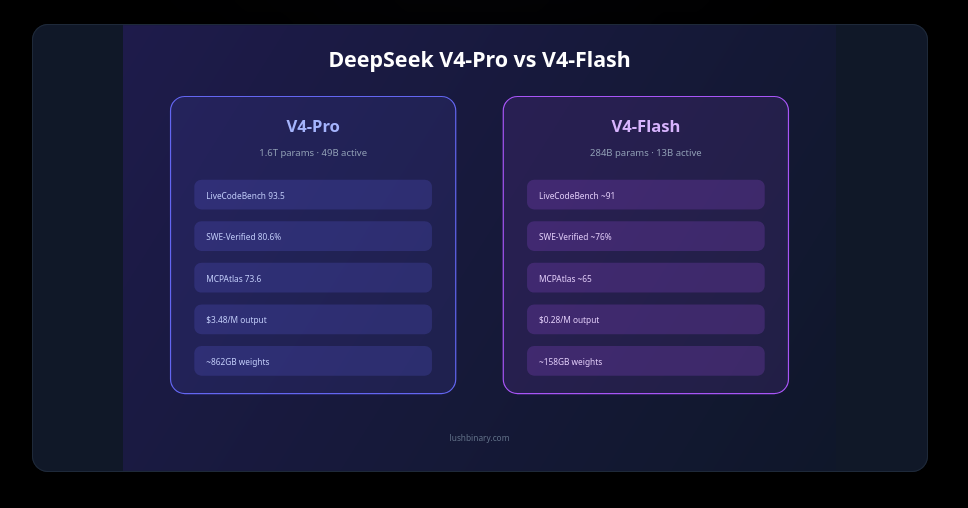
You might ask, why DeepSeek? Well, first let me expand on my first realisation and lesson learned. This applies to all pluggable harnesses like Hermes: their abilities and usefulness are directly linked to the underlying LLM or LLMs that you as a user configure. I started out super worried and with some disbelief, so my first weeks with the agent were based on the quality of answers that the free models OpenRouter was picking for me. Once I realised that this was affecting the agent's ability to self-improve and how it responded to my asks, I pivoted to a paid model. The next challenge became: how can I have a usable and competent helper without spending dollars on every two or three prompts? Enter DeepSeek.
I really like the resources OpenRouter provides in terms of pricing, as well as the countless articles out there about LLM model effectiveness and cost. Currently, in my humble opinion, DeepSeek V4 Flash and DeepSeek V4 Pro offer superb value for money. I could immediately see how the agent became better — the code it was generating improved too, which also resulted in better execution of the different tasks!
Hermes LLM delegation model and config
One of the things that really impressed me about Hermes — and honestly one of the reasons I stuck with it — is how it handles LLM models. It is not just "pick a model and go". Hermes has a proper delegation system where you configure a main model and then a bunch of auxiliary models for side-jobs. See the Configuring Models documentation for details.
The main model is your "brain" — every user message, every tool call, every reasoning step goes through it. This is where you want your best and most capable model. In my case, that is currently DeepSeek V4 Pro through OpenRouter.
But here is the clever bit: the agent does not use the main model for everything. There are 11 auxiliary task slots — things like vision (image analysis), context compression, web page summarization, title generation, approval scoring, and more. Each of these can be overridden independently with a cheaper or faster model. Why burn expensive tokens on summarizing a web page or generating a session title when a flash model does the job just as well?
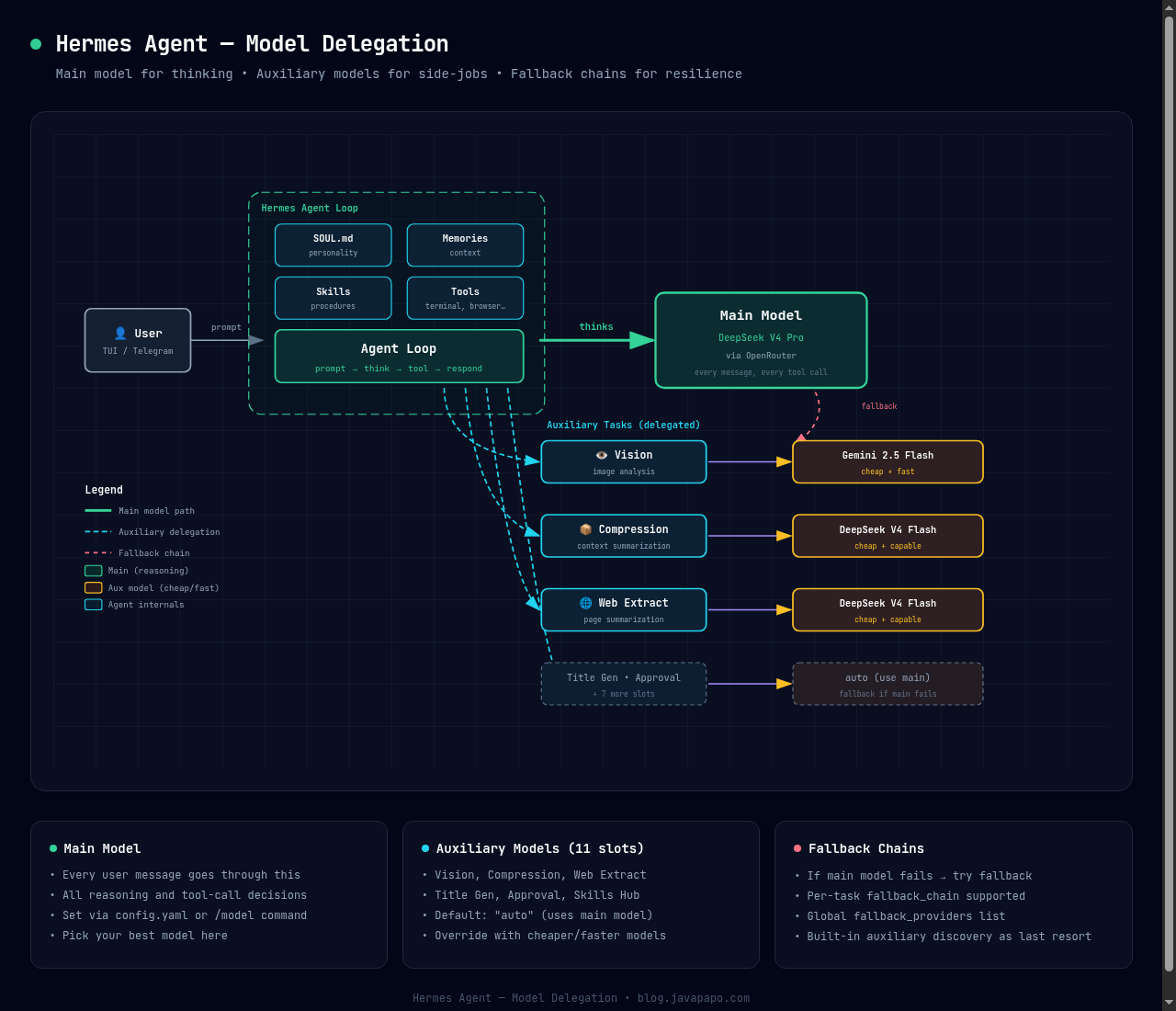
In my setup, I have DeepSeek V4 Pro as the main model, DeepSeek V4 Flash for compression and web extraction (cheap and capable enough), and Gemini 2.5 Flash for vision tasks. Everything else is set to auto, which means it falls back to the main model — and if the main model fails, Hermes has a fallback chain mechanism that tries alternative providers before giving up.
This is where OpenRouter really shines, as I have already elaborated in the previous section. With a single API key I can route my main model through one provider and my auxiliary tasks through cheaper ones, and Hermes handles all the orchestration. The config.yaml is straightforward:
 1model:
 2  provider: openrouter
 3  default: deepseek/deepseek-v4-pro
 4
 5auxiliary:
 6  compression:
 7    provider: openrouter
 8    model: deepseek/deepseek-v4-flash
 9  vision:
10    provider: openrouter
11    model: google/gemini-2.5-flash
12  web_extract:
13    provider: openrouter
14    model: deepseek/deepseek-v4-flash
15  # everything else: auto (uses main model)
The result is that I get a smart, capable agent for the heavy lifting, cheap side-models for the grunt work, and fallback resilience if anything goes down.
I need to say here that once I became somewhat competent and understood the above config, I could not resist experimenting with more frontier models. For example, one day I changed the delegation and auxiliary models to a combination of Claude Opus and OpenAI models. Oh well — this is where I could see my OpenRouter balance go down within minutes.
Did I get better results on the different tasks? Yes I did, especially with reasoning, but I could easily burn 20–30 dollars just by running a complex cron job (more on this later). So learning to tune the config to balance quality against cost became essential.
Beyond model selection, Hermes has several config.yaml knobs that directly affect how many tokens the agent consumes per session. Once I started paying attention to my OpenRouter bill, these became my best friends.
Tuning Hermes — LLM settings worth checking
All the settings below can be found on ~/.hermes/config.yaml.
Reasoning effort
This one was a game-changer for me. Hermes lets you control how much "thinking" the main model does before responding. The reasoning_effort setting accepts low, medium, or high — and the difference in token consumption is dramatic. I guess you have seen the same if you have ever configured Claude Code or OpenCode.
1agent:
2  reasoning_effort: medium   # low | medium | high
On high, the model thinks deeply about every response — great for complex coding tasks, terrible for "what time is it in Tokyo". I keep mine on medium as a default, which is a good balance. But the real trick is that the delegation system has its own reasoning_effort setting:
1delegation:
2  reasoning_effort: low      # subagents don't need to overthink
3  model: deepseek/deepseek-v4-flash
4  max_concurrent_children: 3
5  max_iterations: 25
This means when the agent delegates a subtask to a child agent, that child runs with low reasoning effort on a cheaper model. The parent does the heavy thinking; the children just execute. This alone saved me a lot of tokens.
Context compression
As conversations grow, the context window fills up and the agent starts consuming more and more tokens per message. Hermes has a built-in compression system that automatically summarizes older messages to keep the context manageable:
1compression:
2  enabled: true
3  threshold: 0.5          # compress when context hits 50% of model's window
4  target_ratio: 0.2       # compress down to 20% of window
5  protect_last_n: 20      # never compress the last 20 messages
6  protect_first_n: 3      # keep the opening messages intact
The threshold and target_ratio are the key ones. At 0.5 threshold, the agent kicks in compression when the conversation hits half the model's context window. It then tries to compress down to 20% of the window. The protect_last_n ensures your recent conversation stays untouched — only the older history gets summarized.
And here is where the auxiliary model config connects back: you can (and should) assign a cheap model to the compression task:
1auxiliary:
2  compression:
3    provider: openrouter
4    model: deepseek/deepseek-v4-flash   # no need for a frontier model here
Why pay for Claude Opus to summarize old messages when DeepSeek Flash does the job perfectly well?
Agent turn limits
Another thing worth mentioning is the max_turns setting. This controls how many tool-call loops the agent can perform before stopping to ask for more input:
1agent:
2  max_turns: 150           # main agent — generous for complex tasks
3
4goals:
5  max_turns: 20            # goal-mode tasks — tighter budget
I keep the main agent at 150 turns (the default) which is generous, but for goal-mode tasks — where the agent works autonomously towards a specific objective — I keep it at 20. This prevents runaway sessions where the agent goes on a tangent and burns through tokens chasing something that is not going to work.
The show_reasoning toggle
One more thing worth knowing: you can toggle whether you see the model's reasoning output in the TUI:
1display:
2  show_reasoning: false    # hide the thinking tokens in the UI
3  reasoning_full: false    # or show the full reasoning chain
4  reasoning_style: code    # render reasoning as code blocks
I keep show_reasoning off most of the time — it is noisy and I do not always need to see the model's internal monologue. But when something goes wrong or the agent makes an odd decision, flipping it to true is invaluable for debugging.
The combination of all these settings — model delegation, reasoning effort, compression, turn limits — is what makes Hermes feel like a system you can actually tune to your budget and use case, rather than a black box that just burns money. It took me a few weeks of trial and error to find the right balance, but once I did, my daily OpenRouter spend dropped significantly while the quality of the agent's output stayed more or less the same.
By the way, some of these configs might change or become more complex — it all depends on how fast you keep up with the development of Hermes and apply the updates.
Applying updates and the Hermes folder structure
One thing I learned was that the development pace of the project is pretty fast — I could find myself doing a /update on the Telegram bot a couple of times a day just to keep up. Remember that you also need to do a gateway restart at the same time so that it picks up the new configs and code — /restart.
Remember that Hermes — the agent — is practically a set of Python scripts and subfolders that exist under a predefined folder, in my case ~/.hermes. When you perform the update, the core of the agent is updated along with the built-in skills and plugins that come with the default installation.
Enter profiles — the second lesson learned — create specialists!
So after I became confident with parts of the config — and especially the LLMs that I was using — I decided to take the next step and learn about profiles. What I was noticing, but also reading about (let's go back to the original points about SOUL and memories of an agent), is that they do have a limit. In other words, my agent who initially started as a sysadmin and then also became my personal assistant started having its memory limit reached and began dropping old memories to make room for new ones. Based on the documentation and resources from many users out there, this was a common problem: a multi-faceted agent was really struggling to evolve because I was asking it too many and too diverse tasks. Now, I won't go into the philosophical aspect of it — this relates to how this specific implementation (Hermes) works, and its designers actually had an answer: profiles. Hermes can scale — under the very same installation folder (the core scripts) it can support multiple agents being instantiated, and each one of them lives under a subfolder in the ~/.hermes/profiles directory.
What this means is that, in order to get the most out of my assistants across different domains, I needed to create specialists, spin them up independently, and then federate! For example, I wanted an agent that would be my original Ubuntu Server sysadmin — with skills and tools available only for that task — and it would iterate on them. When it came to a personal assistant, I really wanted an expert that would focus on things like Calendar, Email, reading newsletters, or checking the news for me. Another great example is when I wanted to give my wife a personal assistant. Having one common agent would eventually not work, as each assistant builds its context around a specific user and their characteristics.
The documentation can be found here. So I started federating my agents and creating more instances, each one of them with their own Telegram bot handle and delivering content to me for their area of expertise and focus.
The Hermes CLI makes it super easy to spin new profiles
1hermes profile create coder # creates profile + "coder" command alias
So I pivoted from having a single default agent — which was actually hosted on the root folder of ~/.hermes (configs, .env files, and all) — to multiple agents, each under ~/.hermes/profiles/<name>.
This was my original fleet. Some of these agents exist as of today; some others have changed role or were merged with other specialists!
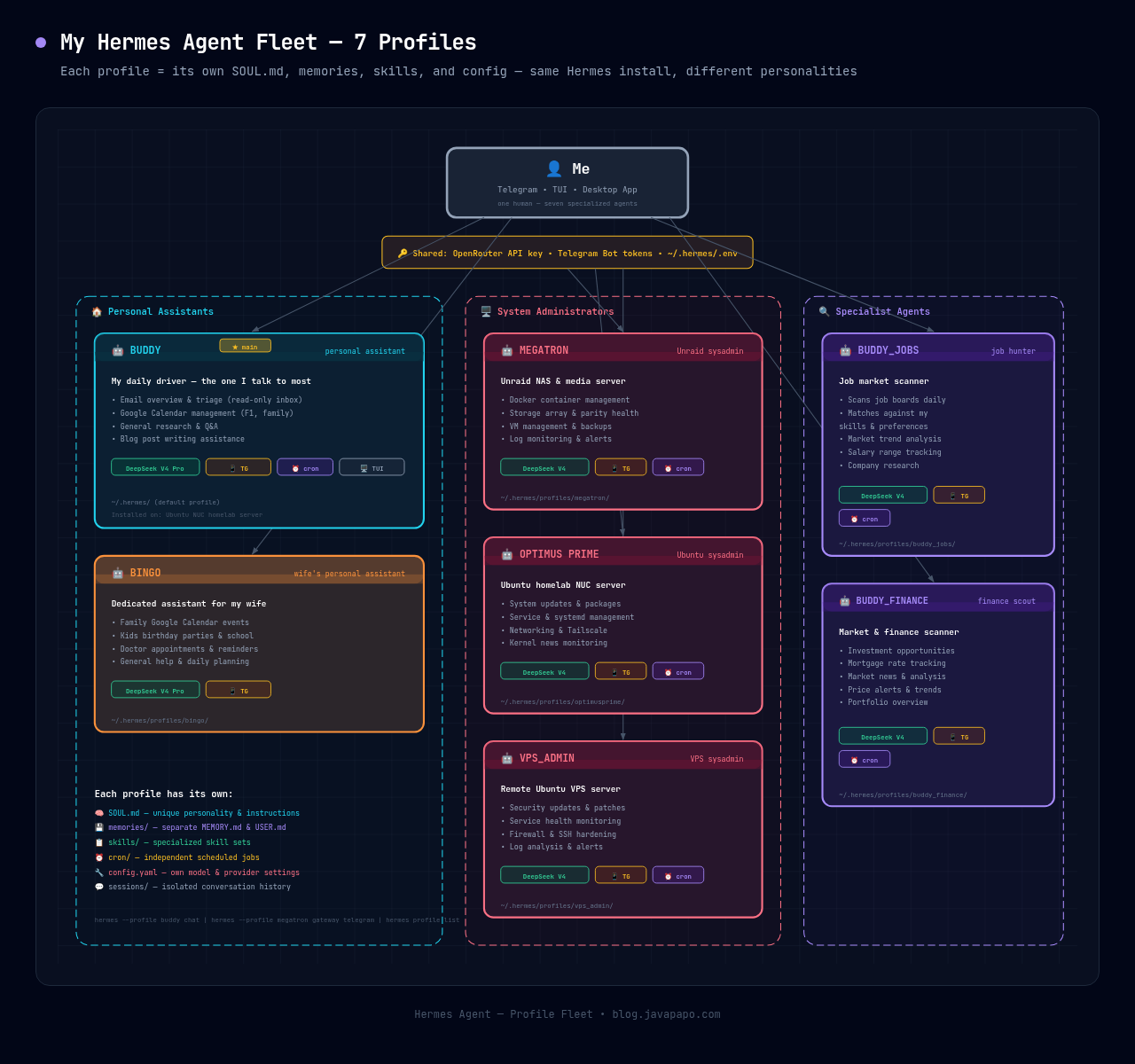
That was a really big moment for my Hermes journey, because that split and specialisation had a direct effect on the quality of data I was getting from the agents. Remember, most of these agents would inherit the same LLM configs I had described above, so all things being equal, they would now utilise a narrower set of skills and plugins in order to deliver some of the jobs that earlier in my journey were all offloaded to the same agent!
And this is my second piece of advice to all of you: when you feel comfortable with Hermes and you think it is the right tool for you, start thinking in terms of personas (profiles) — this will make a huge impact on your potential gains when using these agents!
Now having said that — the fact that I spawned a little army of agents opened a new level for me, to deep-dive and actually control this army. But it is getting late and I think I will continue with a Part 2 soon!
I am not done!
* Note: this post was 90% written by me, a Hermes agent helped me improve the use of English and grammar but the text was typed by me :) it is not AI slop.