My Docker Host Moved Into a VM, and Finally Has a Real Backup
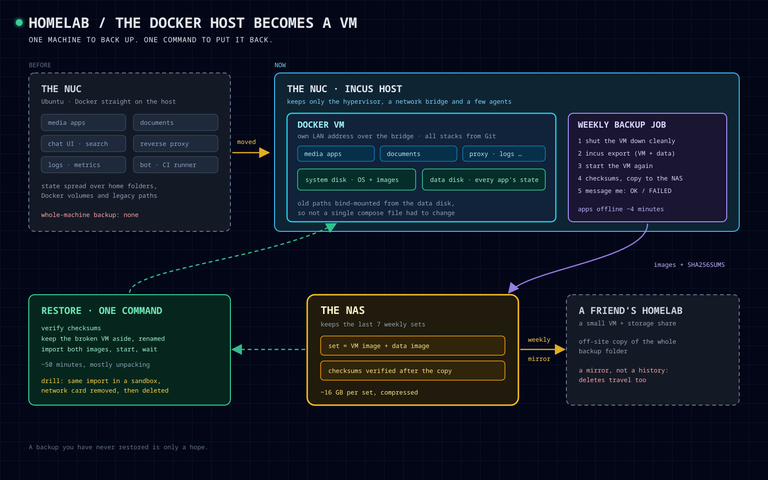
A few days ago I gave my Hermes agents a machine of their own, and I ended that post quite happy that the whole fleet was now one box I can export and restore. Then I looked at my main Docker host and asked myself the same question. If its SSD died tonight, how long would it take me to bring back the media apps, the document archive, the reverse proxy, the logs, the bot and the dozen-plus Git-backed stacks it runs?
Honest answer: a weekend, and a lot of "where did that config live again?". The compose files were in Git, but the state was spread over home folders, Docker volumes and a couple of legacy paths from the days I was still using Portainer. Some of it had a backup. Most of it had good intentions.
Same NUC, one more layer
So this week the NUC stopped running Docker itself. It is now an Incus host, and all the Docker stacks live inside one VM.
Why a VM and not another LXC container, like the agents got? Because this box runs Docker, a CI runner and SMB mounts. Docker inside an unprivileged LXC needs nesting, and that is exactly the kind of thing that breaks quietly at 3am when the stacks auto-update. A VM is boring: it is just another Ubuntu server, and boring is what I want from the machine that serves my family's photos and documents.
A few decisions made the move almost painless:
- A network bridge on the host, so the VM sits on the LAN as a normal device with its own address. Every
*.lanname simply moved to it. - Two disks. A small system disk for the OS and images, and a separate data disk for every app's state.
- The old paths are bind-mounted from the data disk, so not a single compose file had to change. Dockhand redeployed each stack from Git into the VM, one at a time.
The NUC itself keeps very little now: the hypervisor, the bridge and a couple of small agents.
The things that broke were not inside the VM
The stacks came up fine. What broke was everything that still pointed at the old address. My agents' web search, through SearXNG, failed quietly for some of them. The public tunnel happily reported "no available server" for one site. And log shippers on other machines kept posting into the void, buffering to disk and complaining to nobody.
None of them crashed or alerted. Lesson learned, again: before you move a service, list everything that talks to it, not only what it talks to.
Backup take one: wrong tool
My first attempt was the classic one: a nightly restic job, file-level and deduplicated. It worked, and I removed it the same day. I had just spent a week turning the server into one portable thing, and then backed it up as a pile of files that would need a rebuild before a restore. That was the wrong shape. What I actually wanted was the box itself.
Backup take two: the whole VM, weekly
Now a systemd timer on the host does this every Sunday morning:
- Shut the VM down cleanly, so every database is closed.
incus exportthe VM (system disk plus its full definition: CPU, memory, MAC address, cloud-init) andincus storage volume exportthe data disk, both zstd-compressed.- Start the VM again. If any step fails, a trap still starts it.
- Write checksums, copy everything to the NAS, verify the checksums there, and keep the last seven weekly sets.
- Send me a DM on Slack: OK with sizes and downtime, or FAILED with the line that broke. No message means it did not run.
The apps are offline for about four minutes a week. I can live with that.
A backup you have never restored is only a hope
Restoring is one command on the host: it verifies the checksums, renames the broken VM out of the way (nothing gets deleted), imports both images and starts the VM. It comes back with the same MAC address, so the same LAN address, the same tailnet identity, everything.
I tested it with a drill mode: the same import, but into a separate Incus project, with the VM's network card removed before the first boot. That last bit matters. The copy has the same MAC address, tunnel credentials and bot tokens as the real VM, and you do not want two of those on the network. The copy booted, the data disk was there, all the containers came up, and then the drill deleted it.
The surprise was the time: about 50 minutes, and 40 of them were Incus unpacking the system disk image. The export takes four minutes; the import is the slow side. Good to know before the day you actually need it.
Off-site, by accident
While documenting all this, I found something nice. My NAS already had a weekly job that mirrors its whole backup folder to a small VM on a friend's homelab. The new VM images land in that folder, so they go off-site every Sunday for free.
Two caveats I wrote down straight away. First, it is a mirror and not a history: delete something on the NAS and next Sunday it is gone off-site too. Second, the NAS runs on UK time and the backup on UTC, so in summer the mirror runs before the backup and is a week behind. Daylight saving, the gift that keeps on giving.
Not perfect
- The images are not encrypted, and they contain every secret the apps use.
- The NUC itself has no backup. If it dies, I reinstall Ubuntu with my provisioning scripts and restore the VM on top.
- A week of changes can be lost. For a homelab, that is a trade I am happy with.
Lessons learned
- Back up the shape you want to restore. If you want the machine back, back up the machine.
- Separate the data disk. It makes the backup, the restore and the next migration simpler.
- Find the consumers before you move a service. Old addresses do not fail loudly.
- Drill with the network off. A restored copy is a perfect impostor of the original.
The bit I like the most: the recovery plan is written for people who are not admins, step by step, with "which situation am I in?" at the top. Hopefully nobody will ever need it. Let's see how long this setup lasts!