VictoriaLogs for my homelab
Overview
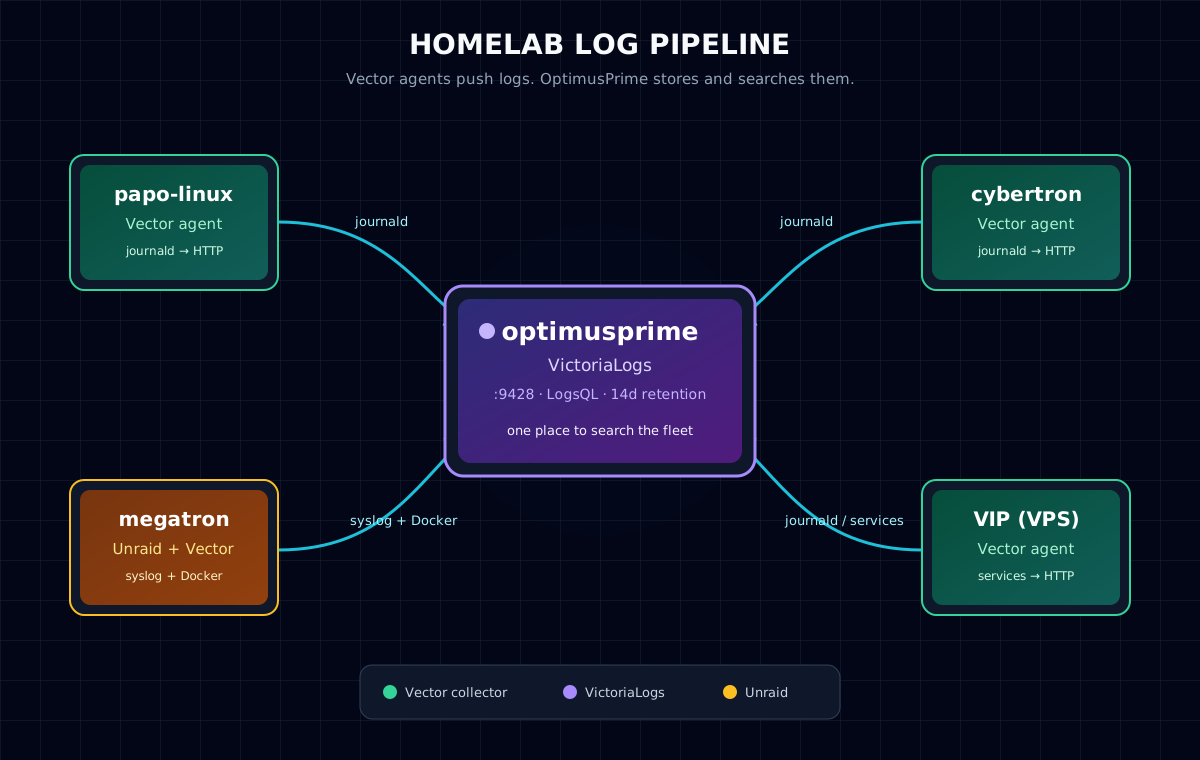
I did not start this because I was looking for a new observability platform. I started because I wanted to check what my multiple Hermes agents were doing.
I have quite a few of them now (I am obsessed). Some run as profiles on the same machine, some run in Docker, and some live on other homelab machines. When I wanted to investigate something, I would SSH into a server and start looking through logs. Then I would remember that the agent I was interested in was probably running somewhere else. It was becoming a bit silly. I run quite a few services across this small homelab anyway, so I realised that I should have centralised logs for most of my hosts.
The setup is simple: optimusprime runs VictoriaLogs, while Vector agents on the other machines collect logs and send them there. This includes my Linux machines, my Unraid server, and VIP.
A lot of the configuration was done with help from my Hermes agents. They helped me check the Vector and VictoriaLogs documentation, explain settings, and adapt the setup for different machines. I still had to decide what I wanted to collect and what I was comfortable exposing on my network, but they made the work much quicker.
The design
optimusprime is already my main Ubuntu and Docker host, so it was the obvious place for VictoriaLogs. The data is kept in a named Docker volume, with fourteen days of retention. Vector runs there as well and collects Docker logs plus selected Hermes host logs.
The other hosts run Vector and forward their logs over the LAN or Tailscale network.
 1+-------------+       +------------------+
 2| papo-linux  |       | cybertron        |
 3| Vector      |       | Vector           |
 4+------+------+       +--------+---------+
 5       |                         |
 6       v                         v
 7                 +---------------------------+
 8                 | optimusprime              |
 9                 | VictoriaLogs :9428        |
10                 | LogsQL / VMUI              |
11                 +---------------------------+
12       ^                         ^
13       |                         |
14+------+------+       +--------+---------+
15| megatron    |       | VIP- Pangolin    |
16| Unraid      |       | Vector           |
17| Vector      |       +------------------+
18+-------------+
Why VictoriaLogs?
I wanted something small and easy to run. I did not want to build a miniature enterprise logging platform just to search the output of a few home servers.
VictoriaLogs by VictoriaMetrics, gives me one place to search the data with LogsQL, while Vector handles collection, filtering, batching, buffering, and delivery. The UI is available at:
1http://<victorialogs-host>:9428/select/vmui
The stream selector already shows why adding a stable host field is useful. I can see records from optimusprime, megatron, papo-linux, pangolin, and cybertron as separate hosts:
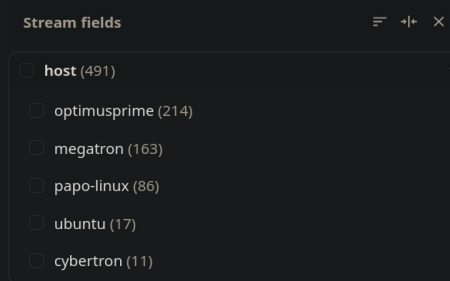
VictoriaLogs' stream fields view. The counts are from the captured screenshot and will change as more logs arrive.
Vector on Linux
On a normal Linux machine, Vector reads from journald and sends the records to VictoriaLogs using the Elasticsearch-compatible ingestion endpoint:
 1sources:
 2  journald:
 3    type: journald
 4    data_dir: /var/lib/vector
 5    current_boot_only: true
 6    include_matches:
 7      PRIORITY: ["0", "1", "2", "3", "4"]
 8
 9transforms:
10  normalize_journal:
11    type: remap
12    inputs: [journald]
13    source: |
14      .host = "papo-linux"
15      .stream = "journald"
16      .service = ._SYSTEMD_UNIT
17
18sinks:
19  victorialogs:
20    type: elasticsearch
21    inputs: [normalize_journal]
22    endpoints:
23      - "http://<victorialogs-host>:9428/insert/elasticsearch/"
24    api_version: v8
25    query:
26      _msg_field: message
27      _time_field: timestamp
28      _stream_fields: host,service,stream
I also use a disk buffer. If VictoriaLogs or the network is temporarily unavailable, Vector has somewhere to keep the events instead of dropping everything immediately.
For anyone interested in Vector, the official documentation is a good place to start. The pages I used most were the Docker logs source, the journald source, the HTTP sink, and the documentation for disk buffering. The main Vector documentation has the rest of the configuration and operational details.
Unraid
Unraid is a little different from Ubuntu. On megatron, Vector collects both Docker logs and the host syslog:
 1sources:
 2  docker_logs:
 3    type: docker_logs
 4    docker_host: /var/run/docker.sock
 5    auto_partial_merge: true
 6
 7  unraid_syslog:
 8    type: file
 9    include:
10      - /var/log/syslog
11    read_from: end
12    ignore_older_secs: 86400
13
14transforms:
15  normalize_logs:
16    type: remap
17    inputs: [docker_logs, unraid_syslog]
18    source: |
19      .host = "megatron"
This gives me a useful distinction between a container producing an error and Unraid itself reporting one. I can search both from the same place instead of switching between the Unraid interface, docker logs, and SSH sessions.
The Docker socket is mounted read-only. That is still broad access to Docker metadata and logs, so this is a trade-off I am comfortable with on my private network, not something I would copy blindly onto an internet-facing host.
A common config
One of the agents also suggested a common Vector configuration for the different hosts. The idea is to collect Docker logs and a selected set of host logs, apply some filtering, batch the events, and keep a persistent buffer. It looks sensible, but I am not adding it everywhere blindly. Journald needs the right mounts and permissions when Vector runs in a container, and the machines do not all run the same services. Unraid also needs its own treatment. The useful part of the proposal is the guardrails: one request in flight, a small rate limit, bounded batches, a 512 MiB disk buffer, and exclusions for Vector and VictoriaLogs so they do not ingest their own logs.
The general shape is:
 1sinks:
 2  victorialogs:
 3    type: http
 4    inputs: [docker_logs, normalize_host_journal]
 5    uri: http://<victorialogs-host>:9428/insert/jsonline
 6    compression: gzip
 7    batch:
 8      max_bytes: 1048576
 9      max_events: 1000
10      timeout_secs: 2
11    buffer:
12      type: disk
13      max_size: 536870912
14      when_full: block
References
These are the projects and documentation I used while putting this together:
- VictoriaLogs — the log storage and query engine.
- VictoriaLogs quick start
- VictoriaLogs and Vector ingestion
- LogsQL — querying the stored logs.
- Vector — the log collection agent.
- Vector Docker logs source
- Vector journald source
- Vector HTTP sink
- Vector buffering model
- Hermes Agent