Syncing Photos from Unraid to Remote Machines with Tailscale
Why I set this up
I got tired of Amazon Photos, at some point the Family setup was broken, my wife was locked out, the Amazon support was not super helpful after several calls. Also the price for storing videos has gone up and up and I felt that enough is enough, I needed to take ownership of my photos. In general I have been quite good on keeping backups of family photos, also I have digitised all my families real photos so I was doing good. It's just that in recent years I have stopped caring and left everything to some SaaS solution (like most of us).
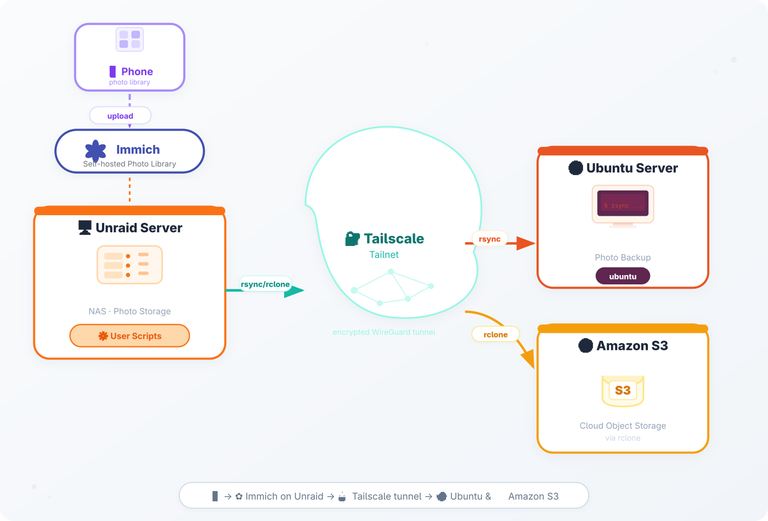
I started by setting up Immich on my Unraid server, then switched on using the Immich iOS App so I could upload files. The fact that I'd already set up my Tailscale tailnet meant I could reach my Unraid server from anywhere!
So the last step of this transition project was to make sure that I backup the photos library of Immich to several different machines, and yes to Amazon, but this time to S3 and specifically Glacier!
The goal was simple:
- Upload photos from my phone directly to Immich.
- Sync the underlying photo folder from Unraid to the remote machines.
- Keep a cloud backup in an Amazon S3 bucket for disaster recovery.
The diagram above visualises the whole flow.
The components
| Component | Role | Key config |
|---|---|---|
| Phone | Takes pictures, runs the Immich iOS app, uploads via HTTPS | Immich app points to https://immich.my-domain.com |
| Immich (on Unraid) | Self‑hosted photo library, stores originals on a mounted SMB share | Docker compose service immich-server + immich-machine-learning |
| Unraid (NAS) | Holds the SMB share that Immich writes to; also runs the sync scripts | Shares mounted at /mnt/user/photos |
| Tailscale | Zero‑config VPN, creates a tailnet that all nodes join | tailscale up --advertise-routes=10.0.0.0/24 |
| Ubuntu Server (remote) | Receives the synced photos; I use them for local backups and occasional processing | rsync pull job triggered by a user script |
| Amazon S3 | Long‑term backup of the photo bucket | rclone sync from Unraid to s3://my-photo-backup |
The back up pipeline
RClone Plugin on Unraid
The first thing I needed to install on Unraid in order to kick start my backup pipeline was rclone. I used this plugin. Through its web-ui interface I was able to add some of my remote machines as destinations, this plugin also installs the rclone binary on Unraid.
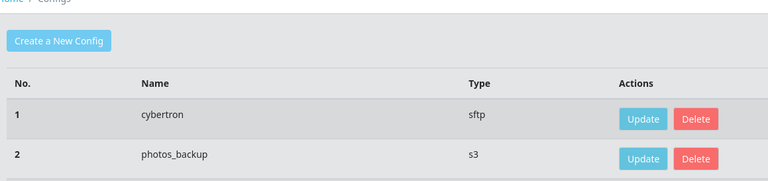
As you can see below I have defined 2 different destinations, one is Amazon S3 and the other is another remote server (part of my extended homelab)
Unraid User Scripts (rsync with schedules)
So now, I needed a scheduled job (something like cron) to perform the rsync from the Immich Photo Library to the destinations. For that I needed to install and configure the CA User Scripts plugin.

Each job needs to have its own folder under /boot/config/plugins/user.scripts/scripts/<name_of_job> . Inside the folder you need to 2 files, one called name and script. The name is just a file that contains the name of the job, I guess for Unraids UI to display things but the actual script is the one that does the job.
So within the script - you simply have rclone
1rclone sync /data/media/photos/ photos_backup:my-photo-glacier \
2  --progress \
3  --track-renames \
4  --transfers 4 \
5  --checkers 8 \
6  --exclude "immich_library/encoded-video/**" \
7  --exclude "immich_library/thumbs/**" \
8  --exclude "immich_library/profile/**"
Make note the photos_backup part on the destination of the rclone command - is actually the name of the config you have assigned on the rclone web UI.